
Guidelines for Work Load Planning AY2627
The Workload Planning application (WLP) has been updated for the AY26-27 Academic Year. Users should select the academic year '26-'27 from the drop-down menu to obtain a new load planning form.
Locating the WLP Application: The application is located in the “My Services” area of the portal under the “Employees” tab.
Planning Period: The planning period runs from March through June. Proposed load plans should be reviewed and approved by your Academic Unit Leader by June 30th.
Load Deductions from Required Teaching Load: All faculty will continue to receive an assumed deduction of three hours from their required teaching load for service. Thought Leadership load varies by track:
- Tenure-track faculty will receive a 3 SH deduction from their required teaching load for research/thought leadership.
- Professional Practice and Teaching track faculty do not receive an automatic deduction for research/thought leadership. Professional Practice track faculty have an annual research load allocation of 0-3 SHs, so WLP is defaulted to 0 SH. Professional Practice Track Faculty should add thought leadership/research load that has been discussed and approved by their dean as appropriate.
Training: It is suggested that faculty review the Workload Planning Guide - Faculty prior to entering a workload plan, and approvers should review the Workload Planning Guide - Approver prior to approving faculty load for AY2627.
Additional Guidelines
- The workload requirements used in WLP match those outlined in the revised FP-102 policy. (See below.) WLP provides an additional calculation, Required Teaching Load, which is displayed in the Faculty Information section at the top of the form. Required Teaching Load uses your annual workload minus 3SHs for Service and any planned Reassign Time.
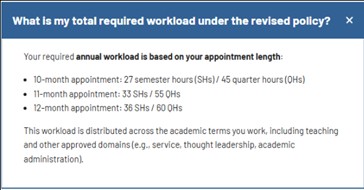
- Verify that your faculty information is reflected accurately in the Summary Section of WLP. Please note that 11-month appointments are not coded in Banner and are therefore not presented in WLP.

- Review the assigned CRN’s area in the Approved Section.
- The courses listed here are a direct feed from Banner’s Scheduling application, so if a course appears in this section, you have already been scheduled to teach that course.
- Unfortunately, due to a complication in Banner, these scheduled courses are ALWAYS pulled into WLP as OVERLOAD. (See graphic below.) This is not an ideal situation, but incorrect entries can be corrected.
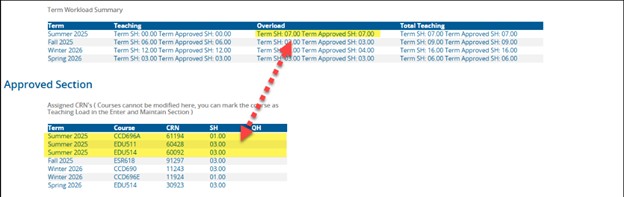
-
- If a course in this section should be Teaching Load, select “Add New” in the Maintain Load section and re-enter the course as Teaching Load. The course will be eliminated from the Assigned CRN’s section and appear in the Dean Approved Teaching Load section when the entry is approved and the form is refreshed.
- FP102 outlines various workload timeframes based upon appointment duration. Work Load Planner uses a modified Academic Year of SUMMER through SPRING. You’ll be planning load for Summer (202660), Fall (202690), Winter (202710), and Spring (202730). Annual load and overload limits should be applied to these terms.
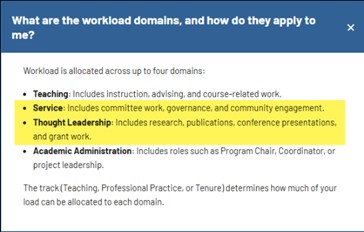
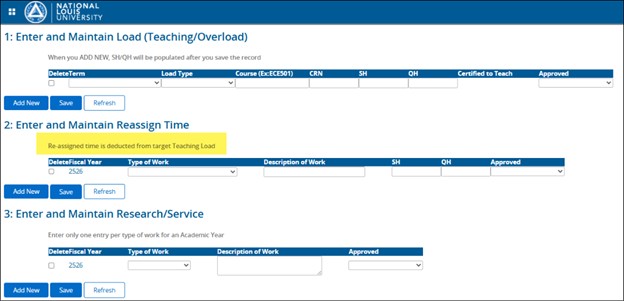
- Consider using these workload domains in the "Description of Work” when entering your “Reassign Time” and “Research/Service” and if your role requires “Academic Administration."
-
- Load entered into Maintain Reassign Time is deducted from the Required to Teach total at the top of the form. Research/Service entries do not capture load and therefore are not deducted.
- Refer to the Thought Leadership Load Allocation Guidance and Service Activity to Service Workload Table in FP-102 for allocating load hours in these sections.
- Review the Faculty Work Plan Summary Report for outliers and work plans that need to be addressed. This report is emailed to all Approvers in WLP weekly. (If you are an approver, and not receiving this report, please contact kdobbin@nl.edu.)

-
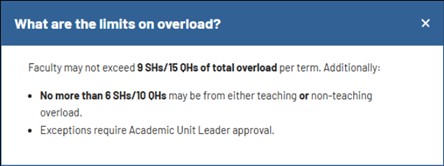
- Scan the Teaching Load and Overload totals per Term, and review faculty workload plans for variances flagged in the report to ensure that load is within requirements outlined in FP-102. Please note that Overload reported is Instructional Overload, and should not exceed 6 SHs per term, per FP-102. (Non-Instructional Overload is not included in these totals.)